
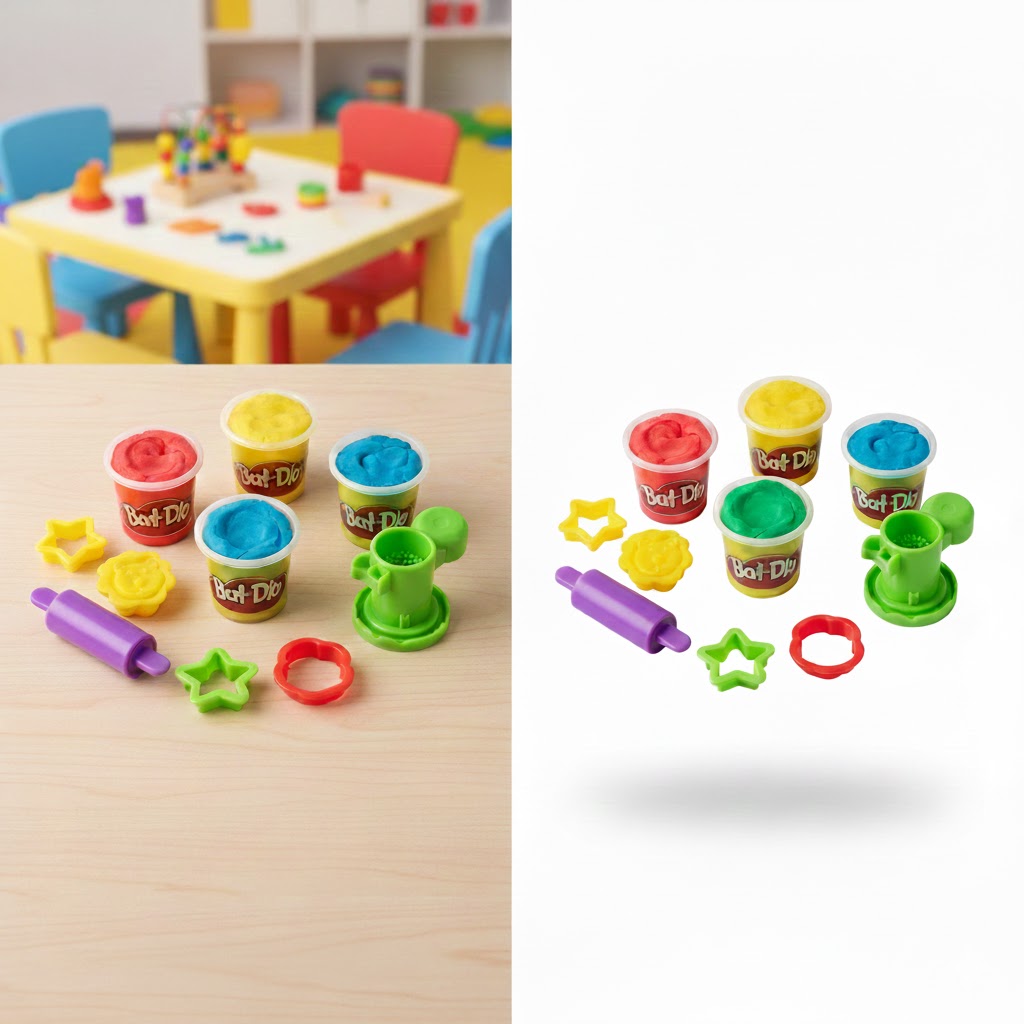
Image background white is the gold standard for selling products online. If you run an e-commerce store, you already know that presentation can make or break a sale. A clean, pure white background doesn’t just look good—it builds trust, highlights product details, and meets strict marketplace requirements on platforms like Amazon and eBay. Yet achieving that flawless white background is harder than it sounds. This guide explains the right way to do it and how SnapCutBG makes the process fast, accurate, and scalable for online sellers.
Why Image Background White Is Essential for E-commerce
Before diving into the “how,” let’s clarify the “why.” A white background plays a critical role in online selling:
- Professional appearance: Products on a white background look polished and credible, helping buyers trust your brand.
- Marketplace compliance: Amazon, eBay, and Walmart often require a pure white background (RGB 255, 255, 255) for main product images.
- Higher conversions: Clean visuals reduce distractions, helping customers focus on features and benefits, which increases click-throughs and sales.
- Marketing flexibility: Once your product is isolated on white, it’s easy to reuse it in ads, banners, catalogs, and social media creatives.
In short, image background white isn’t optional—it’s a competitive advantage.
Common Mistakes When Changing Backgrounds to White
Many sellers try DIY photo editing and quickly hit a wall. Here’s why basic methods fail:
- Magic Wand tools: These rely on color similarity and often leave rough edges, halos, or missing details—especially with hair, fabric, or glass.
- Eraser tools: Hard edges look fake, while soft edges create gray shadows that ruin the clean white look.
- Poor lighting: Dark shadows and uneven lighting are difficult to fix later, even with advanced editing.
These shortcuts often result in images that look amateur and can hurt buyer confidence.
The Professional Workflow for Perfect White Backgrounds
Achieving a true image background white usually involves three key steps:
1. Start With a Good Product Photo
- Use a neutral or light background when shooting.
- Light the product evenly with soft light to minimize shadows.
- Keep the camera steady to avoid blur.
2. Precision Background Removal
Professionals use advanced tools (like pen paths and edge detection) to separate the product cleanly from the background while preserving fine details.
3. Set True White and Fix Color Spill
The background must be pure white—not off-white or gray. Color spill from surrounding surfaces must also be corrected so edges look natural.
This process works—but it’s slow, technical, and impractical for sellers managing dozens or hundreds of SKUs.
The Modern Solution: SnapCutBG for Image Background White
This is where SnapCutBG.com simplifies everything. Built for e-commerce sellers, SnapCutBG automates the professional workflow using AI—without sacrificing quality.
Why SnapCutBG Works Better
- AI-powered precision: The system intelligently detects products and handles complex edges like hair, fabric, and transparent objects.
- Background color range selector: Unlike basic tools, SnapCutBG can remove subtle gray shadows and uneven tones by targeting specific color ranges—perfect for achieving a true white background.
- Marketplace-ready white: Instantly replace backgrounds with clean, compliant white that meets Amazon and eBay standards.
- Custom background options: For marketing, you can also upload branded or lifestyle backgrounds directly inside the tool.
- Batch processing: Edit multiple images at once and save hours of manual work.
With SnapCutBG, image background white becomes a one-click process instead of a multi-hour task.
Why E-commerce Sellers Choose SnapCutBG
Online selling is about speed, consistency, and quality. SnapCutBG delivers all three:
- Faster product launches with uniform visuals
- Consistent branding across listings and ads
- Higher perceived product value and trust
Instead of struggling with complex software, sellers can focus on growing their business.
👉 Try it now: Visit https://snapcutbg.com/ and create perfect white-background product images in seconds.
Final Thoughts: Clean Backgrounds, Better Sales
A professional image background white is one of the simplest ways to improve your store’s performance. It enhances credibility, meets platform rules, and helps customers see exactly what they’re buying. Whether you sell on Amazon, eBay, or your own website, clean visuals are non-negotiable.
Don’t let poor backgrounds hold your products back.
Upload your image to SnapCutBG.com today and get flawless white backgrounds—fast.
Helpful Resources
- Amazon Product Image Guidelines – Official requirements for product images, including white background rules
https://sellercentral.amazon.com/help/hub/reference/G200728050 - E-commerce Photography Tips – Learn how to shoot clean, high-converting product photos
https://www.shopify.com/blog/product-photography
- Amazon Product Image Guidelines – Official requirements for product images, including white background rules