PDF to Image Converter Online Free Without Email: AI-Powered Clarity
pdf to image converter online free without email tools are everywhere—but when you need to turn PDF pages into crisp, shareable images, quality matters just as much as speed. Whether it’s a receipt you want to send on WhatsApp, a slide you want to post on social media, or a report page you need to embed in a blog, converting PDFs into images is a daily digital task. Unfortunately, many traditional converters produce blurry text, broken layouts, and dull visuals that reduce impact.
This is where AI-powered conversion makes a real difference. In this guide, you’ll discover how SnapCutBG delivers professional-quality results, why AI conversion is superior, and how you can convert PDFs to images in seconds—completely free, without email sign-ups or watermarks.
Why Convert PDFs to Images in the First Place?
Before jumping into the process, let’s understand why a pdf to image converter online free without email is so useful across industries:
Instant sharing on social media: Images perform better than PDFs on platforms like WhatsApp, Instagram, Messenger, and X (Twitter).
Presentations & reports: Charts, tables, and slides from PDFs are easier to reuse as images in PowerPoint or Google Slides.
Universal access: Images open on any device without requiring a PDF reader.
Web & blog content: Images embed faster and look cleaner inside articles and landing pages.
All these use cases demand one thing above all else: clarity. That’s exactly where AI steps in.
The Problem with Traditional PDF Converters
Most standard PDF converters rely on basic rendering engines. The result is often disappointing:
Pixelation and blur when zooming in
Text that loses sharpness and readability
Distorted layouts in multi-column documents
Slow processing for multi-page PDFs
For students, professionals, and creators, these limitations waste time and reduce credibility.
The AI Advantage: Why SnapCutBG Is Different
SnapCutBG isn’t just another pdf to image converter online free without email. It uses advanced AI to analyze and enhance your document before converting it into images—delivering results traditional tools simply can’t match.
The 3 Free AI Wins (Fully Justified)
1. AI Quality Enhancement
SnapCutBG doesn’t merely export pages—it intelligently upscales resolution. The AI improves sharpness so images look clearer than standard PDF screenshots or exports.
2. Text & Layout Intelligence
The AI recognizes text blocks, headings, charts, and spacing. This ensures the original structure stays intact—no squashed text, no misaligned graphics.
3. Automatic Background Cleanup
Scanned PDFs often contain shadows or uneven tones. SnapCutBG’s AI cleans and brightens backgrounds automatically, producing professional, presentation-ready images.
👉 These three AI wins are completely free—no trials, no subscriptions, and no email required.
How to Use SnapCutBG: Step-by-Step
Converting PDFs with SnapCutBG is simple and beginner-friendly.
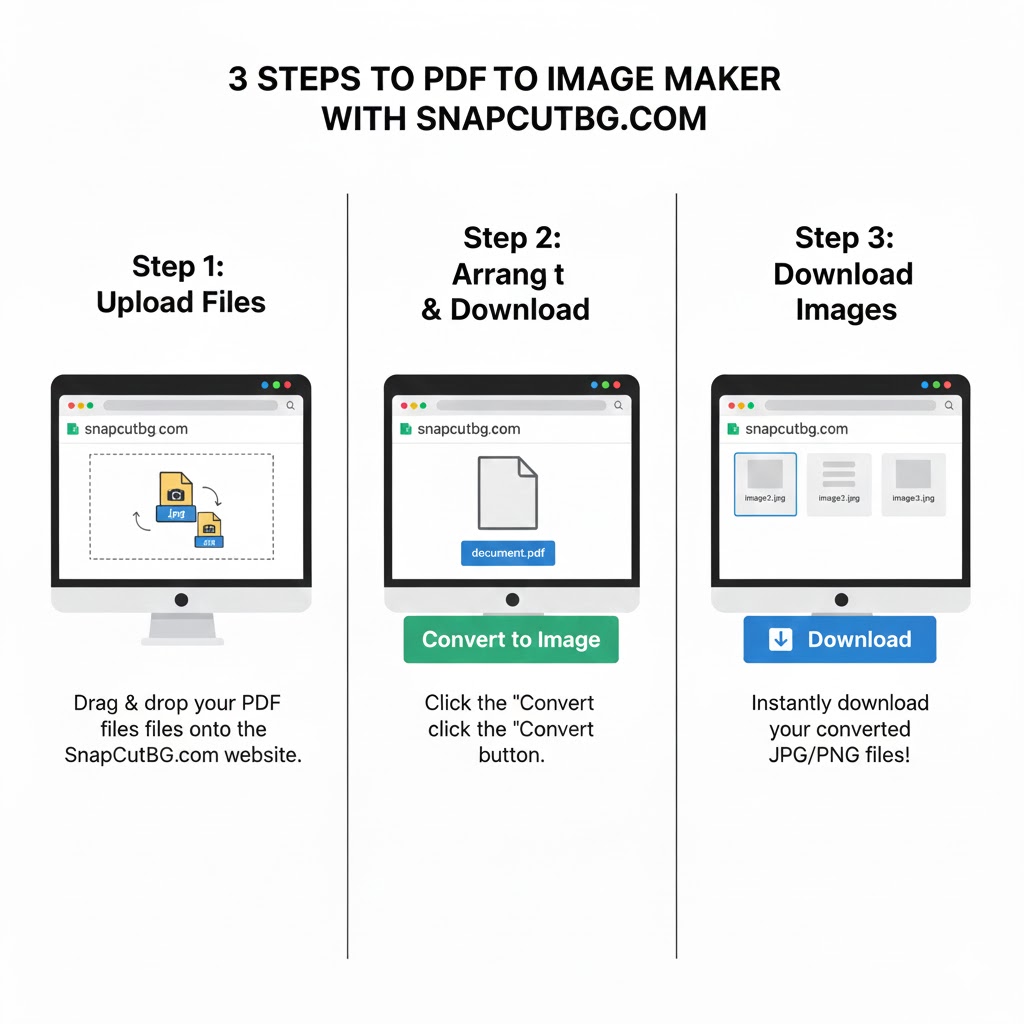
Step 1: Visit SnapCutBG
Go to 👉 https://snapcutbg.com/ and open the PDF to Image tool.
Step 2: Upload Your PDF
Drag and drop your file or click Upload. No registration needed.
Step 3: AI Processing
SnapCutBG’s AI instantly analyzes your document and prepares it for high-quality conversion.
Step 4: Choose Image Format
PNG: Best for text-heavy documents, reports, invoices
JPG: Ideal for scanned pages and visual content
The AI automatically optimizes quality based on your choice.
Step 5: Download
Your images are delivered in a clean ZIP file—ready to use anywhere.
Pro Tips for Best Results
Use PNG for resumes, contracts, and reports
Use JPG for scanned documents and photos
Convert only the pages you need to keep file sizes small
This workflow is far faster than manual screenshots or outdated desktop software.
Security & Privacy You Can Trust
SnapCutBG processes files over secure HTTPS and automatically deletes them after conversion. Your documents are never stored or shared—making it safe even for sensitive business or academic files.
Why SnapCutBG Is the Smarter Choice
Many tools claim to be a pdf to image converter online free without email, but SnapCutBG truly delivers:
100% free
No watermarks
No email or sign-ups
AI-powered quality enhancement
Works on any device
Final Thoughts: Clear Images, Zero Compromise
Blurry conversions shouldn’t slow you down. With SnapCutBG, you get AI-driven precision, fast performance, and professional results—without paying a cent.
👉 Try SnapCutBG now: https://snapcutbg.com/
Upload your PDF, let AI do the work, and download crystal-clear images in seconds.
Once you experience the difference, you’ll never go back to basic converters again.
Helpful Resources (Learn More)
What is a PDF File? (Wikipedia)
https://en.wikipedia.org/wiki/PDFBest Practices for Working With PDFs (Adobe Blog)
https://www.adobe.com/acrobat/resources.htmlImage File Formats Explained: JPG vs PNG (Mozilla MDN)
https://developer.mozilla.org/en-US/docs/Web/Media/Formats/Image_typesAI in Document Processing (IBM Think)
https://www.ibm.com/think/topics/document-processing